
I’ve been getting lots of emails from Google Ads urging me to incorporate Enhanced Conversions for our clients’ accounts. I normally ignore most Google emails as they have no bearing on what we do.
But, the Enhanced Conversions emails keep coming, to me and to my clients. “ACTION RECOMMENDED!” “Set up Enhanced Conversions now!” “Unlock more powerful bidding!”
What they are: “Enhanced conversions help the Google tag capture more conversion data in a privacy-centric way, improving the accuracy of your measurement.”
Why they’re important: “It enables you to measure online conversions and build a strong foundation of first-party data.” (Source: Ditto)
How it works: When a customer completes a conversion on your website, you may receive first-party customer data such as an email address, name, home address, and/or phone number. This data can be captured in your conversion tracking tags, hashed, sent to Google in its hashed form, and then used to enhance your conversion measurement.
Read the full Google Ads Help File.
“First party data” is the key word here
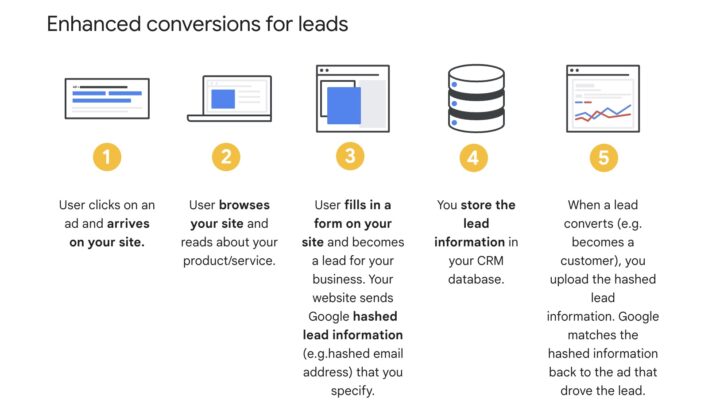
As the graphic above demonstrates, when someone converts on your website (aka: completes a form), your website will then send this info to Google.
But wait, it gets better. When the person becomes a customer, **you then send that info to Google — and they’ll let you know which ad prompted the conversion.**
Wow. Thank you so much, Google!
Behind the scenes . . .
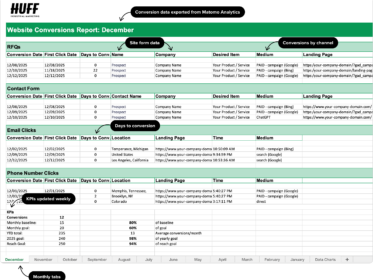
Thankfully, our clients already know which ads convert — without having to send any info to Google — because we track this stuff weekly and list it in our custom Weekly Conversion reports. (See also: Matomo Analytics: A Game Changer for HIM)
What’s our “secret”? None. Since we use Matomo Analytics, I add tracking parameters to the URLs in Ads. The parameters lets us know which ads and site links converted.
So, when someone fills out an RFQ form that’s on the website, the client’s sales team gets that info immediately. A week later, our report shows the name / company name of the lead and where the lead came from.
I know. Scary simple.
The Conversion Report also shows spend, clicks, conversions, and cost per conversion for current month and year-to-date. Clients *always* know where they stand.
Caveat: Because I work with solely with manufacturers who need lead generation, I only do search ads versus P-Max or display ads — so maybe those campaigns are harder to track. (I’ve tested Display and Remarketing; both drive a ton of impressions but no conversions.)
If you’re a smaller manufacturer with a small spend and every dollar counts, don’t be bamboozled by Google and their TAKE ACTION NOW recommendations.
Always read the help files before making any changes to your account. Google’s recommended changes will almost always benefit Google ($$$$), not you.